086 819 7027
  • Facebook
  • X
  • Instagram
  • RSS
  • Facebook
  • X
  • Instagram
  • RSS
Business Brains
Menu
  • Home
  • Services
    • Transform your business
      • e-Learning Development
        • Excel Development
      • Microsoft Project Development
      • SharePoint Development
      • Book a free consultation
    • Empower your team
      • Articulate 360 Training
      • Excel Training
      • Power BI Training
      • Power Pivot Training
      • SharePoint Training
      • Visio Training
      • Macros & VBA Training
      • Get a quote for training
    • Close
  • About Us
  • Contact
    • Book a free consultation
    • Get a quote for training
    • Contact Us
    • Close
  • Blog
    • Everything
    • Reviews
    • Articulate Storyline
    • Microsoft Access
    • Microsoft Excel
    • Microsoft Office
    • Microsoft Outlook
    • Microsoft Powerpoint
    • Microsoft Project
    • Microsoft Word
    • VBA and Macros
    • Close
Select Page

Copy and Paste Productivity via the Clipboard [When Things Go Wrong]

The geeky cake. Read what happened here.   I always love it when I train people who have limited computer skills and I get to show them copy and paste or cut and paste. While initially confused by the concept, they soon adopt the clipboard functionality and it...

Get Excel charts and tables always up to date in your Microsoft PowerPoint presentation [Instant Productivity Free Tutorial]

You need two files to follow this tip: an Excel spreadsheet with a chart or some data in it and a PowerPoint presentation. Video: Get Excel charts and tables always up to date in your Microsoft PowerPoint presentation   Copy the data or chart from Excel Switch to...

Don’t type it all over again! Re-use text in Word documents and Outlook messages thanks to AutoText [Instant Productivity Free Tutorial]

Copy and Paste will only get you so far. Rather than type the same bits of text and pictures over and over again, be it your address, your terms and conditions, your disclaimer, your location map or logo, save them as AutoText entries in Word. AutoText entries work in...

Recent posts

  • Build interactive Excel spreadsheets with developer tools28 March 2022
  • How to stop and restart your Microsoft Project schedule20 July 2020
  • Six elearning development characters
    Top Keyboard Shortcuts in Articulate Storyline5 November 2018
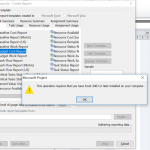
  • Fix Microsoft Project Error: ‘Excel 2003 or Later Required’22 June 2018
  • TOP 10 Keyboard Shortcuts for Excel Spreadsheets22 May 2018

Categories

  • Articulate Storyline
  • E-Learning
  • Geeky Fun
  • General
  • Microsoft
  • Microsoft Access
  • Microsoft Excel
  • Microsoft Office
  • Microsoft Outlook
  • Microsoft Powerpoint
  • Microsoft Project
  • Microsoft Word
  • News
  • Reviews
  • Testimonial
  • Uncategorized
  • VBA and Macros

Blog

  • Business Brains Blog
  • Articulate Storyline
  • Microsoft Access
  • Microsoft Excel
  • Microsoft Office
  • Microsoft Outlook
  • Microsoft Powerpoint
  • Microsoft Project
  • Microsoft Word
  • VBA and Macros

Recent Posts

  • Build interactive Excel spreadsheets with developer tools
  • How to stop and restart your Microsoft Project schedule
  • Top Keyboard Shortcuts in Articulate Storyline
  • Fix Microsoft Project Error: ‘Excel 2003 or Later Required’
  • TOP 10 Keyboard Shortcuts for Excel Spreadsheets

FAQ

Read the Training FAQ

Get in touch

Get in touch with us now to discuss how we can help implement training and improve the way you work.

1 Ardagh Park Road, Blackrock, Co. Dublin
Book a free consultation
Request a training quote
Contact us
+353 86 819 7027
[email protected]

Our Policies

  • Data Collection and NDAs
  • Terms & Conditions
  • Cookie Policy (EU)
  • Facebook
  • X
  • Instagram
  • RSS